Friday, March 13, 2020

WHMS GAME OF DRONES 3

GAME OF DRONES 3
Game of Drones is a competition of modified drones where the goal of the remote pilot is to go through obstacles and complete missions in 5 minutes. The drone with most number of points with the fastest time wins the game.

Playing Field

                  1.       The playing field consists of ground loops, air balls, targets, rotating loop, and landing missions.
                  2.      The base has a diameter of 30".

Drone Specifications

                 1.     Maximum size of drone is 8" x 8".
                 2.     Weight should be less than 55 pounds.
                 3.     Any FPV cameras, monitors, or goggles, and electronic upgrades are allowed.
                 4.     There is a maximum of 3 playing drones per team.

General Rules

                 1.      Failure to show at the playing area 2 minutes after the scheduled time will cause the team to forfeit the game.
                 2.     Referee's decision is final.
                 3.     The referee may recall teams for a tiebreaker round if needed.

Rules

                 1.      The team will have to decide first if their trial is a coded trial or a remote controlled (RC) trial. It cannot be both at the same trial.
                 2.     Programmed trials are worth three times (3x) the RC points.
                 3.     The drones will start at the landing pads (base).
                 4.    When the signal to start is given, the remote pilots will have the drones take off and do any of the missions in any order.
                 5.     All missions or challenges are on a one-time credit only. Points will not be gained on repeated tasks. 
                 6.     Mission 1 is to go through loops 1-3, in any order.
                 7.     Mission 2 is to knock out the floating balls in the air. Ball must touch the ground to get credits.
                 8.     Mission 3 is to push the targets 1-3 in down position.
                 9.     Mission 4 is to go through the rotating loop.
               10.     Mission 5 is to land at any base safely with drone in disarm mode (propellers not spinning). This is a signal that the team has decided to stop the game at their discretion, and can be done at any time. Referees will record the time of the drone that last landed.
                11.    If all missions and challenges are completed, and a drone wants to attempt to land again on the base (to get perfect landing points), it must go through any one of the loops first before landing again.
                12.    Spotters and other team members currently playing are allowed in the field but must have a protective gear like goggles, otherwise, the team will be disqualified.
                13.    Touching, retrieving, fixing, repositioning, or resetting a drone by a human person is allowed but that drone will have to restart at the base without the time stopping. The other drones in flight and not touched will not be affected by this rule.
                14.     A negative five (-5) points will be awarded for every instance a drone is touched.
                15.     The team will have to signal the referee to stop and record the time and points by using an alarm or horn at any given time (to quit or to let the referee know that their last drone had its final landing at base).
                16.     Maximum time of a trial is 5 minutes.
                17.     The best of the two trials will be taken for the final score and time.
                18.     The drone team with most points and the fastest time wins the game.

Property of robotnook.com
©2015 Mario Malabunga. All rights reserved.


Thursday, March 12, 2020

WHMS Search and Rescue Activity Bot

SEARCH AND RESCUE ACTIVITY (S.A.R.A)
The goal of this game is to search and rescue people in the area, activate the rocket, read the hidden code, retrieve bombs, and release the alien/spaceship in 5 minutes. The robot with most number of points with the fastest time wins the game.
Playing Field
1.      The base is 4' x 8'.


Robot Specifications
1.     Maximum size of robot is 6' x 6'.
2.     Weight and height is unlimited.
3.     Any FPV cameras, monitors, or goggles, and electronic upgrades are allowed.
General Rules
1.     Teams must stay inside the enclosed tent, without view of the field.
2.     Failure to show at the playing area 2 minutes after the scheduled time will cause the team to forfeit the game.
3.     Referee's decision is final.
4.     The referee may recall teams for a tiebreaker round if needed.
Rules
1.     The robots will start at the Base (4'x8' board).
2.     When the signal to start is given, the drivers will drive the robots to any area in the field to do any of the Missions in any order.
3.     Mission 1 is to retrieve the persons and bring them back to the base (must be completely on the base).
4.     Mission 2 is to activate the rocket by flicking the launch toggle switch. (credit given if switch is flicked even if rocket failed to take off)
5.     Mission 3 is to do a reconnaissance task and know the hidden code in the building.
6.     Code must be reported to the referee.
7.      Mission 4 is to release the alien/spaceship (balloon tied on the ground).
8.     Mission 5 is to retrieve the bombs and bring it back to the base (must be completely on the base).
9.     Mission 6 is to return back to the base. This is a signal that the team has decided to stop the game at their discretion, and can be done at any time. Referees will record the time when the robot has parked.
10.   No spotters and other team members are allowed in the field except to retrieve the robot back to the base for repairs (see Rule 10).
11.    Touching, retrieving, fixing, repositioning, or resetting a robot by any team member is allowed but the robot will have to restart at the Base without the time stopping.
12.   Team members are allowed to do any activity related to the robot like setting attachments, unloading gathered items, etc. but must be done only on the base.
13.   The team will have to signal the referee to stop and record the time and points by using an alarm or horn at any given time (to quit or to let the referee know that their robot has parked at Base).
14.   Maximum time of a trial is 5 minutes.
15.   The best of the two trials will be taken for the final score and time.
16.   The robot with most points and the fastest time wins the game.


Engineering Tips
        1.    When possible, build a wide framed quad motored design to ensure driver contact at all times. 
        2.    Articulated suspension can assist with obstacles. 
        3.    Ensure the claw functions adequately for the task required. 
        4.    Same with any arms necessary with appropriate servos and rotation. 
        5.    Practice each mission until it can be one smoothly and efficiently.  The Army has a saying: Slow is smooth, smooth is fast.
        6.    Ensure your camera on the robot is giving you the whole picture.  If not, there will be tasks you can’t complete. 
        7.    If you see the code while executing a previous mission, read it.
        8.    Conduct a post mission analysis for next year.

Friday, November 22, 2019


WHMS WreckingBots 2.0 Considerations and Build

WreckingBots 2.0
WreckingBots is a game where robots wreck the tower of cubes, drop the opponent's cubes into the corner bin and push the opponent's' base switch to decrease the opponent's' life {by point system). Robots should be built in a way that it survives the 5-minute game of physical contact with other robots.


Playing Field
1.    The playing field is 16' x 16' in size.
2.    Each base has an area of 3 feet square.
3.    The ball switch has about 1' clearance from the ground.
4.    The ramp incline is about 26 degrees.
5.    There are 20 blocks in total (10 blocks for each team)

Robot Specifications
1.    The maximum size of the robot is 3' x 3' (length and width) and must fit in the base.
2.    Weight and height are unlimited.

Not Allowed
1.    Chemical or liquid
2.    Fire or flammable materials
3.    Rope, strings, or similar materials to damage robot operations
4.    EMP generators
5.    Signal jammers
6.    Blades
7.    Projectiles
8.    Explosives
9.    Guns
10.  Sticky materials

General Rules

1.    Robots may be autonomous or remotely controlled.
2.    Failure to show at the playing area 2 minutes after the scheduled time will cause the team to forfeit the game.
3.    Judges decision is final.
4.    The referee may recall teams for a tiebreaker round if needed.

Rules

1.    All robots will have 100 life points at the beginning of the game with a designated color of block and base.
2.    Robot's life diminishes depending on the color of the block dropped completely into any of the crates by any robot. Each block dropped is equivalent to –5 life points.
3.    If the switch of a base is tripped once (indicated by a solid light), the robot of that base may Jose 20 life points. It can be switched back to regain life points.
4.    If the switch of a base is tripped again (indicated by blinking light), the robot of that base may lose 30 life points. It can be switched back to regain life points.
5.    There will be at least a 15-minute break between elimination and final rounds to enable winners to fix their robots and have it inspected again.
6.    The robot that has the most life points at the end of a 5-minute elimination match wins the game and advances to the final match.
7.    Scores will reset in the final round.
8.    Once a robot is immobile, damaged beyond repair, or thrown out of the playing field, it will be considered a "knockout" and the other robot wins regardless of points.

property of robotnook.com
©2015 Mario Malabunga. All rights reserved.


These are the published rules for the competition build.  In order to determine the best build, we have to break the competition into tasks.

1.       No larger than 3x3 ft and fit in the Base.
2.      Be able to pick up blocks and transport them up the ramp and into the basket.
3.      Move the ball switch back and forward.
4.      Be able to drive up a 26-degree slope.
5.      Be tall enough to not get stuck on blocks (2").
6.      Be robust enough to not be wrecked by the opponent’s bot.

Now let’s talk about build considerations:

1.       If gearing is an option, consider it.
2.       Have an articulated arm and be able to move it vertically, and horizontally in 3D.
3.      Last year there were several bots that high centered on blocks, effectively immobilizing them for the entire match.  Make the suspension high enough to drive over blocks and up the ramp.
4.      If the frame is higher, it needs to be wider to prevent being pushed or tipped over because the articulated arm must operate at an average height of 1 ft off the ground.
5.       Articulated arm can be dual purpose…tripping the ball switch and picking up blocks. 
6.       Last year, the WHMS WreckingBot fell apart on the field.  Consider using nuts with nylon inserts to prevent them from falling apart under duress.
7.       Several bots last year lost their sync with the controller.  Harden the connections and controllers to ensure it maintains sync.  You can’t touch it after it starts. 


I will add more as time permits, including photos.


Monday, June 10, 2019

Robotics Component Description


What are the building blocks of a basic robot?


These are the building blocks of a robot. There may be others, but these will get the basic configuration and completion of a robot that will meet most requirements.


Basic

Structural members. Structural parts will provide you with a strong framework for building your project. Channels, brackets, beams and more keep your project rigid and stable while also giving you multiple attachment points for expansion.

Connectors. Hardware that will keep your project together. This includes a variety of screws, couplers, and collars to secure everything.

Motors. DC Motors for any project that needs to get moving. Gears and sprockets would be nothing without these micro, standard, and precision gear motors!

Wheels or tracks. Mobility on your project is completely function driven, as is gearing and motor selection. The selection of Wheels should has something for just about any need. From the big heavy-duty off-road wheels, skate wheels, turf wheels to the various sizes of precision disc wheels, there’s a lot to choose from. Track provides options for high ground contact applications and off-road.

Axles, shafts, and tubing. Shafts and Tubing are used to either form rigid structure, or drive-shafts for wheels, servos, levers, and more. Most tubes can be wide enough to accommodate a multitude of wires to keep your project neat.

Mounts and Hubs. These parts let you support moving components, interface various structural components, and are the basic building blocks to connecting all components together. All hubs and mounts should connect together in a variety of configurations. This can be done using custom drilling and manufacture or through universal bolt patters available commercially or any combination of this.

Controller. The controller is a fully integrated, programmable brain for your robot that features a variety of motor, servo, encoder, and sensor ports with convenient connectors that enable you to control your robot's behavior. Some controllers are only for motors, some are for servos; some control both. Another component that goes hand in hand with the controller is the remote control for functions not defined by programming. We use an aircraft R/C quality low interference control console.

Battery pack. The robots need power to provide the voltage signals that make the motors turn, the sensors operate and the robot brain. The simplest way of doing so is to use batteries. Based on the needs of the robot for power, combinations of rechargeable batteries can be added to reach the desired power requirements.

Wiring. Just enough length of stranded wiring and specialty wiring harnesses to reach from point to point to power or allow control of electrical components.

Advanced components

Servos. Servo motors are essential in most robotic applications. We have a wide range of accessories from mounts, gears, and housings to make using them quicker and easier.

Gears. Transferring power can be tricky, but we have all the gears, pulleys, and sprockets to get the power where you need it. Best of all, you don't have to worry about spacing or getting things lined up perfectly, the hole patterns take care of that for you.

Sensors. Sensors replicate the senses of the human body and in some cases, functions that we don't have but can use to complete actions in an autonomous or controlled environment.

  • Cameras & Vision Sensors
  • Contact & Proximity Sensors
  • Gyroscopes
  • Infrared & Light Sensors
  • Linear & Rotary Resistors
  • Localization & GPS
  • Magnetic Sensors / Compass
  • Pressure Sensors
  • Sound Sensors
  • Temperature & Humidity Sensors

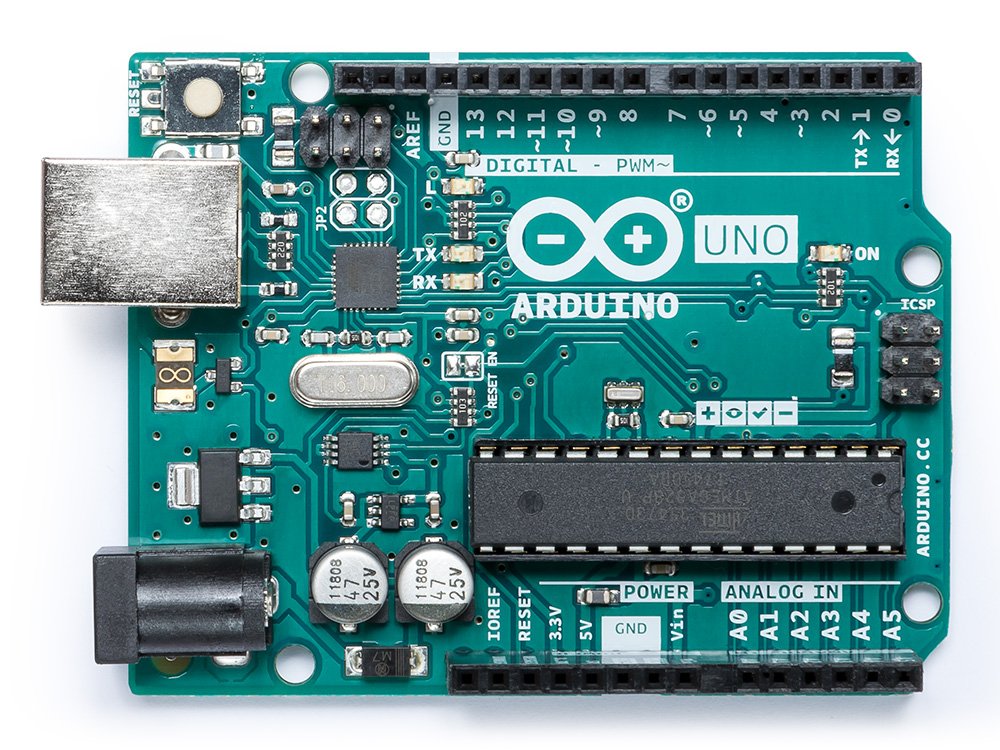
Arduino. A microcomputer that can be programmed that acts as the controller for the robot. It can define pre-measured sequences or it can use sensors to run decision sequences that allow it to have some autonomous activity.

Raspberry Pi. A microcomputer that can be programmed using a number of programming languages that act as the controller for the robot. It can define pre-measured sequences or it can use sensors to run decision sequences that allow it to have some autonomous activity.

Camera. Cameras or camera type sensors can be built into the robot to function as a remote viewer or recorder.

Specialty components. There are many specialty components like articulated robot arms, pneumatic suspensions, shocks that can be used to enhance a robot’s capabilities or to meet specific design goals.

Hydraulics. Hydraulics are a very advanced addition to any robot. They allow inclusion of rack and pinion type assemblies, stilts and rapid extensions in the design of a robot.

Tools needed

Drill Press

Miter saw with metal blade.

Titanium bits

Small Metal Brake


Friday, May 24, 2019

The ALICE Coding Environment


    One of the technology standards of the Hoke County STEM Competition is coding in the ALICE coding environment.  It is an object oriented, block based programming environment that allows kids to build games and animations using the system.  In our competition, competitors build animations to tell a specific story that is judged against the other competition.  It is a live, elimination event. Here are some details about the ALICE environment:
  • It is used by teachers at all levels from middle schools to universities.
  • It has a broad scope of application within the educational environment.
  • It was developed by Carnegie-Mellon University and is provided as freeware to introduce students to coding.
  • There are two versions available, ALICE 2 and ALICE 3.
  • CMU is very proactive in providing resources for education, practice, teachers, and students to enhance their ALICE experience.
Duke University has tutorials for learning to code in ALICE 2 & 3.  Here are the links to the YouTube videos: